Use case: interview scheduling
Stop the email back-and-forth to book an interview
Three emails to find a time, a fourth to confirm, a fifth when they ask to move it. In Neither you press one button: it finds times free for everyone, emails them to the candidate, books the one they pick and reminds them.
The problem
Scheduling is the admin nobody counts. Each interview costs a handful of emails, a look at two calendars and a reminder you have to remember to send. With ten candidates in play, it is most of a morning.
How it works in Neither
- Connect Google Calendar once and set your working hours. Only times inside them are offered.
- On the candidate's profile, press Schedule interview. Choose how soon, how long and who joins; your colleagues' calendars are checked too.
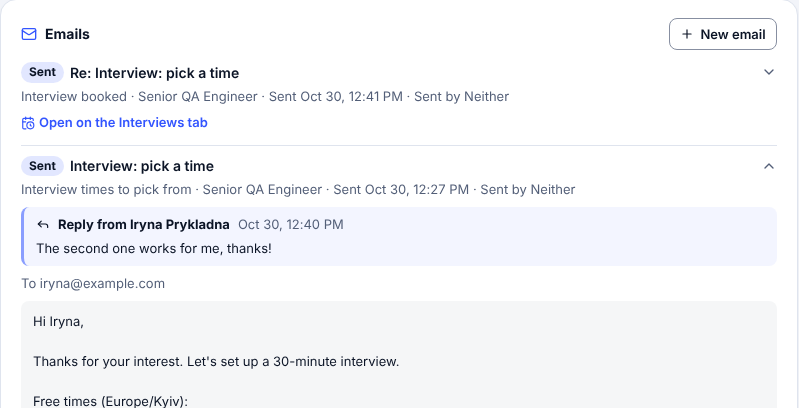
- Choose Let them pick. Neither holds free times in your calendar and emails them to the candidate with your name. Or choose Book a time and send the invitation yourself.
- The candidate replies in their own words. A time that works is booked, the held times are released, and both of you get a confirmation. If they ask for other times, new ones are offered.
- No answer gets one reminder. The day before, the candidate is asked to confirm. The notetaker joins the interview.
What stays with you
- Who gets an interview, and with whom.
- Anything unclear: a question or a reply Neither can't place waits for you in Tasks, with the times still held.
- What to do when a candidate pulls out.
Good to know
- It works with Google Calendar. Interviews get a Google Meet link, or a Zoom one if you connect Zoom. Outlook calendar is not supported.
- There is no self-booking page: the candidate picks by replying to the email.
- An admin sets how many times are offered, how long they are held and whether the reminder goes.
Questions
Does the candidate need an account or a booking link?
No. They reply to the email in their own words, and Neither books the time they name.
What if the candidate doesn't answer?
One reminder goes within a day. After 72 hours the held times are released and you are told.
Can colleagues or the hiring manager join?
Yes. The times suit their calendars and working hours too, and they are invited.
What does it cost to try Neither?
Neither's HR Free plan is $0 with no card. Recruiter is $99 a month, and Team is $249 a month for 3 recruiters.
Try it on one vacancy
Free to start, no card. Sign up with Google and paste your first vacancy.
More ways Neither saves typing
Use cases
- Interview notes written from the call
- Every applicant scored against every open role
- CVs and documents become the profile
- Interview scorecard from a job description
- Missing candidate details collected by email
For agencies choosing an ATS
- Spreadsheet or ATS for a small agency
- How to choose an ATS for a small agency
- Every step of hiring, and who does what
- What Neither does for recruiting agencies