Use case: interview notes
Stop writing up interviews in the evening
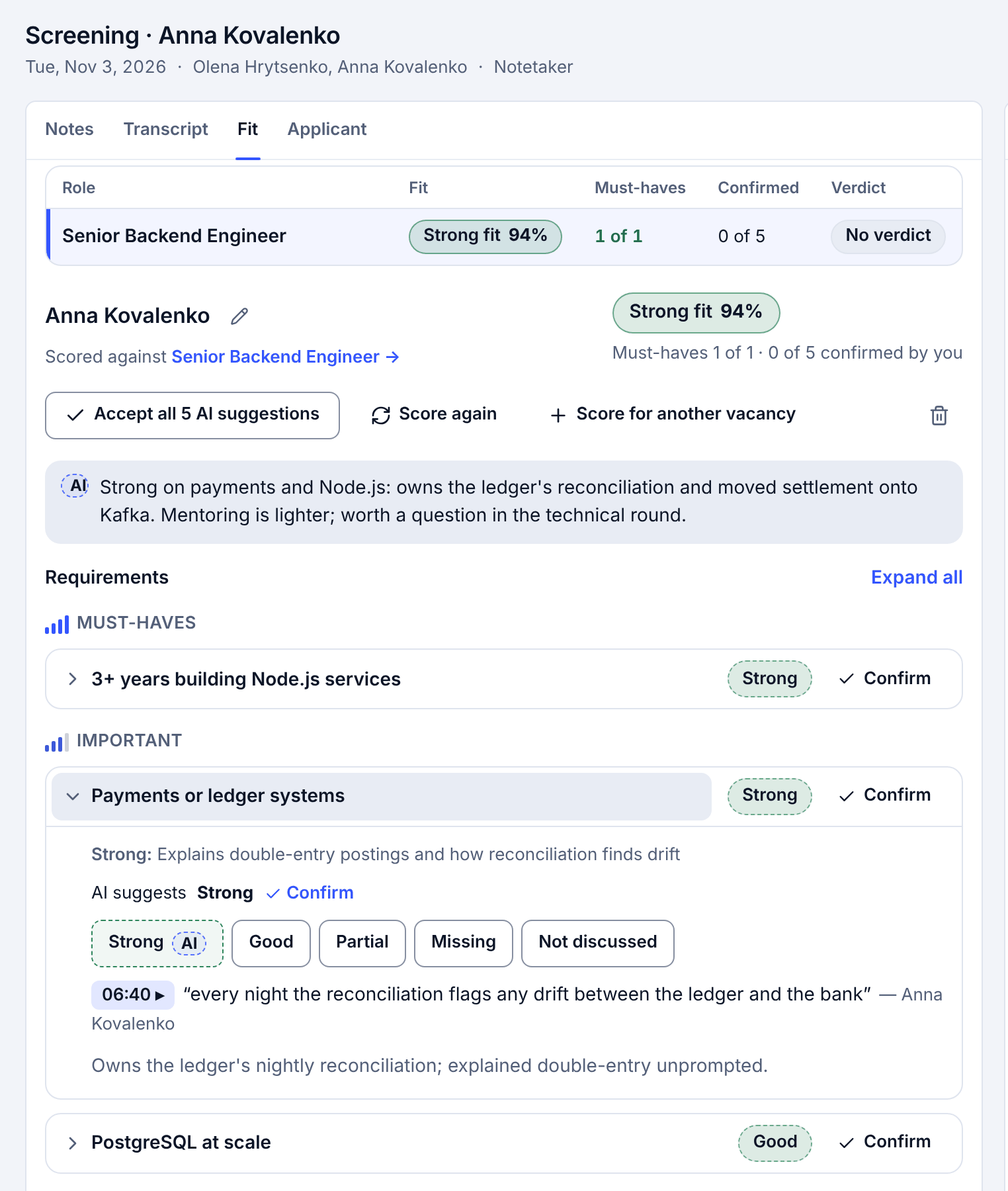
You run four interviews a day and write them up after six. In Neither the call is written up for you: the notetaker records it, files it to the right candidate, and one click scores it against the vacancy, with the candidate's own words under each score.
The problem
Interview notes are the part of the job nobody sees. You take half-notes during the call, rebuild the rest from memory in the evening, and the client still asks how the candidate's English really was. The details that decide a hire end up in your head or in a chat.
How it works in Neither
- Connect Google Calendar once. The notetaker joins the interviews on your calendar in Google Meet, Zoom or Microsoft Teams.
- After the call, the recording and the transcript are filed to the right candidate. You don't pick them.
- One click scores the interview against every requirement of the vacancy. Each score quotes the candidate, with a timestamp; a quote that isn't in the transcript is dropped.
- You read the scores next to the CV and the other interviews, and decide who moves forward.
What stays with you
- Who moves forward, and what you tell the client. Neither never rejects or hires anyone.
- Telling the candidate that the call is recorded. The notetaker doesn't announce itself in the call yet.
Good to know
- The notetaker waits in the waiting room or lobby like any guest, so someone has to let it in. The notetaker guide shows where on each platform.
- It works with Google Calendar. Outlook calendar isn't supported yet.
- Call recordings are kept for 30 days.
Questions
Which meeting tools does the notetaker work with?
Google Meet, Zoom and Microsoft Teams, for interviews on your Google Calendar.
Can I trust the quotes?
Each quote is checked against the transcript, and one that isn't found there is dropped. Every score shows the timestamp, so you can find the moment in the recording.
Does it work for interviews in Ukrainian?
Yes. Interviews, scores and the app work in Ukrainian and English.
Try it on one vacancy
Free to start, no card. Sign up with Google and paste your first vacancy.
More ways Neither saves typing
Use cases
- Every applicant scored against every open role
- CVs and documents become the profile
- Interview scorecard from a job description
- Missing candidate details collected by email
- Interviews booked without the back-and-forth
For agencies choosing an ATS
- Spreadsheet or ATS for a small agency
- How to choose an ATS for a small agency
- Every step of hiring, and who does what
- What Neither does for recruiting agencies