For recruiting firms on Google Workspace
The ATS for recruiting firms that already run on Google Workspace
Neither fits a recruiting firm of 2–15 people that works in Gmail, Google Calendar and Google Meet: interviews are booked from your calendar, a notetaker joins the calls and each profile fills in from what comes in. It does not fit a firm that works only in Outlook or Microsoft 365, or one that needs job-board posting at scale, because those are not live yet.
Updated
Who it fits, and who it doesn't
It fits
- Firms of 2–15 people who work in Gmail, Google Calendar and Google Meet.
- Teams that interview every week and want each call filed to the right candidate.
- Teams that work in Ukrainian or English.
Not live yet
- An Outlook calendar, so a firm on Microsoft 365 only is not a fit.
- Job-board posting, a careers page and a candidate self-booking page.
- A sync with another ATS.
What happens in Gmail
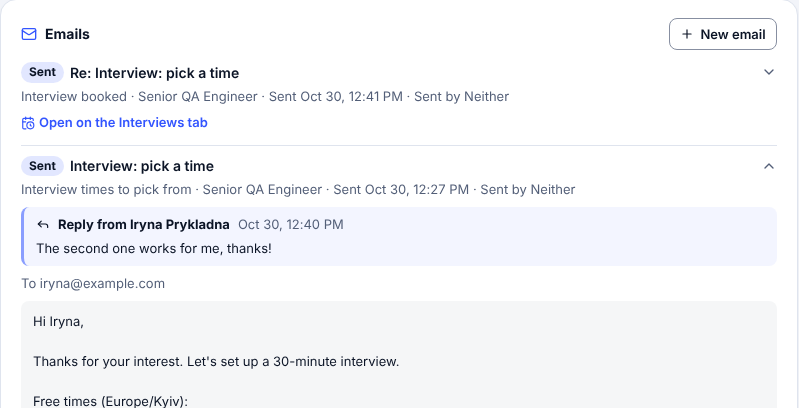
- On the candidate's profile you press Schedule interview. Neither finds times that are free in your calendar and your colleagues', inside the working hours you set.
- It emails those times to the candidate in your name, from your own Gmail once you connect it. Or you book a time and send the invitation yourself.
- The candidate replies in their own words. The time they name is booked, the other held times are released and you both get a confirmation.
- With no answer, one reminder goes. The day before, the candidate is asked to confirm.
Neither asks Google only for permission to send mail. It can't read your inbox. Each email carries its own reply address, so the candidate's answer appears on their profile for the whole team.
Calendar and Meet
- Each booked interview goes on your Google Calendar with a Google Meet link, or a Zoom link if you connect Zoom.
- Only times inside your working hours are offered. Colleagues' calendars are checked for when they are free or busy, never for what their events are.
- The notetaker joins the interview in Meet from your calendar, keeps the recording and transcript and files the call to the right candidate. It waits in the waiting room like any guest, so someone has to let it in.
- Facts the candidate says on the call, such as notice period or salary expectation, are read from it and added to the profile. Each fact shows that it was heard on a call, with the words it rests on, and you can fix or undo it.
Drive: only the files you choose
When you add a CV or a document from Google Drive, you pick it in Google's own file picker. Neither can open the files you pick and nothing else in your Drive.
Set up in five steps
- Sign up with Google.
- Connect Google Calendar in Settings and set your working hours.
- Turn on sending from your own Gmail, in Settings or when you first email a candidate.
- Paste a vacancy to get its scorecard, or add a candidate.
- Press Schedule interview on a candidate's profile.
Questions
Which Google permissions does Neither ask for, and why?
Four, all verified by Google. Calendar, read only: your free and busy times and your time zone, to offer times that suit you. Calendar events on calendars you own: to put an interview on your calendar and cancel it. Send email: to email candidates from your own Gmail. Files you pick in Drive: to open a CV or a document you choose. Neither never asks to read your inbox.
Does Neither read my inbox?
No. It can send mail from your Gmail and nothing more, because it has no permission to read your messages. A candidate's reply reaches their profile through the reply address in each email.
Does it work with Outlook or Microsoft 365?
Not yet. Interviews are booked in Google Calendar, and there is no Outlook calendar. The notetaker can join Teams and Zoom interviews that are on your Google Calendar.
Where is my data kept?
In the EU. Neither's database is in Frankfurt, Germany.
What does it cost to try Neither?
Neither's HR Free plan is $0 with no card. Recruiter is $99 a month, and Team is $249 a month for 3 recruiters.
Try it on one vacancy
Free to start, no card. Sign up with Google and paste your first vacancy.
More ways Neither saves typing
Use cases
- Interview notes written from the call
- Every applicant laid out against every open role
- CVs and documents become the profile
- Interview scorecard from a job description
- Missing candidate details collected by email
- Interviews booked without the back-and-forth
For agencies choosing an ATS
- Spreadsheet or ATS for a small agency
- How to choose an ATS for a small agency
- Every step of hiring, and who does what
- What Neither does for recruiting agencies